Every photo from her quinceañera, collected with one QR code.
A quinceañera fills a hall with family, the corte de honor, and a hundred phones taking pictures all night. Put one QR code on the tables and every guest joins the photo team. Guests scan it with their phone camera and upload straight from the browser. There is no app to install and no account to create. Every photo and video arrives in your own connected storage at full resolution, organized by guest name.
No app. No guest accounts. No subscription. No expiry.
$39 one-time payment covers unlimited events.
- Price
- $39, one time
- Events
- Unlimited
- Guest app
- None needed
- Storage
- Your own storage
- Resolution
- Full, always
- Expiry
- Never
Made for quinceañeras
The moments one photographer can't cover
The photographer follows the birthday girl. Meanwhile the cousins are filming the baile sorpresa from three angles and the tías are catching the best candids of the night. One code brings all of it to you instead of leaving it scattered across everyone's camera rolls.
Family who couldn't travel
Grandparents and family far away can watch the gallery fill up the same night. Share one link and they see every photo as it arrives. The gallery never expires, so it will still be there to look back on at her graduation and her wedding.
A live slideshow at the reception
Put the gallery on a screen during the reception and photos appear moments after guests upload them. Seeing their shots on the big screen gets more guests scanning and uploading.
A photo plan for her quinceañera
Set out cards before the reception
Create the event, connect the host’s storage account, and download its QR card design. Place cards at the welcome table and guest tables. Test a printed card on a phone before guests arrive.
Ask for the dance from every angle
Ask the emcee to introduce the gallery before the vals or baile sorpresa. Invite guests to share short clips as well as photos, and remind them to wait for the upload confirmation before closing the page.
Give distant family the gallery link
Send the same gallery link to relatives who could not travel. After the party, share it once more so the corte and cousins can add the moments still on their phones. The guest page follows each phone’s English or Spanish language setting.
Wording for your QR table card
Share the moments you caught! Scan to add your photos and videos from the quinceañera. No app or account needed.
Copy this wording into the QR designer after creating your event. Use your event’s own QR code on the card, then download it to print at home. Professional printing is optional and costs extra.
How GalleryQR works
You create a gallery, guests scan a QR code, and photos arrive in your connected storage. Setup takes about two minutes.
Before your event
Create your gallery and print your code
Connect your storage, name your event, and you get a QR code plus a link like galleryqr.com/e/your-event. Print the code on table cards, project it on a screen, or text the link to everyone.
During your event
Guests scan and upload
Guests point their phone camera at the code and upload straight from the browser. There is nothing to install and no account to create. You can watch photos arrive live as a slideshow.
After your event
Everything is in your connected storage
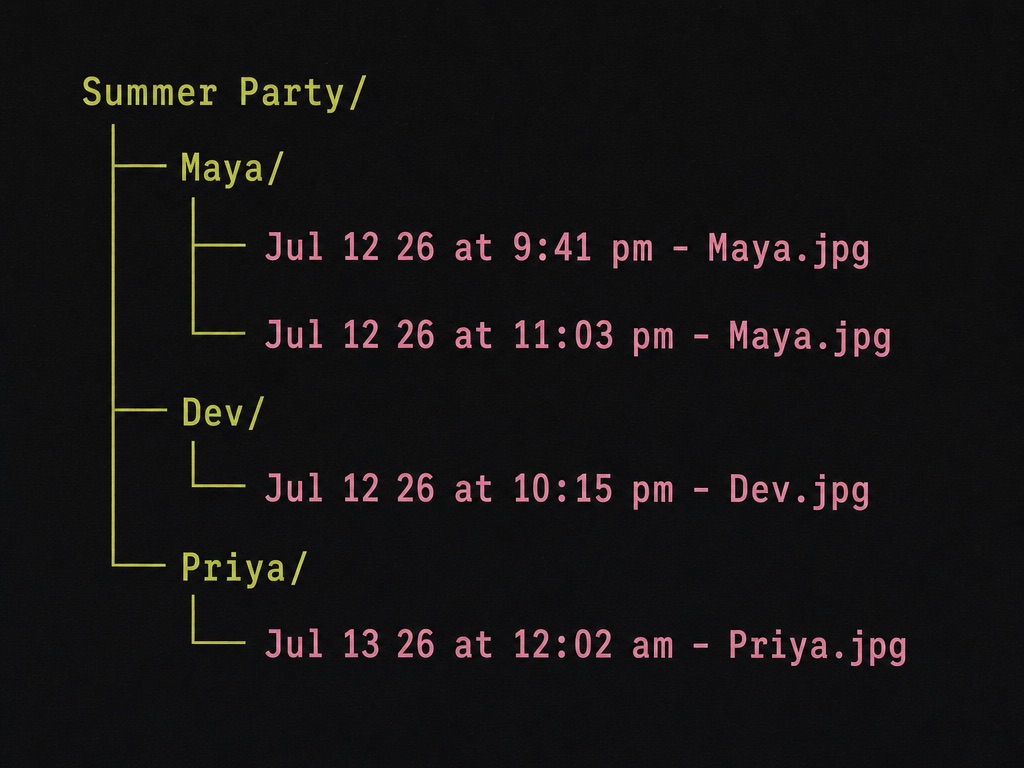
Photos are saved to your own storage at full resolution, organized into folders by guest name, and each file is named by the time it was taken. The gallery never expires.
Where your photos go
Choose Google Drive, OneDrive or Dropbox for your event. GalleryQR organizes originals into guest folders in that account, with capture dates in filenames when available. The example shows the layout in Google Drive.
Frequently asked questions
Do guests need an app or an account?
No. Guests point their phone camera at the QR code and upload from the browser. It works on iPhone and Android with nothing to install, so everyone from the corte to the grandparents can contribute.
Does it work for guests whose phones are set to Spanish?
Yes. The guest pages are natively in Spanish and follow each guest's device language automatically. Uploading is two steps, scan and pick photos, so most guests never need to read instructions.
Can we use it for the next family celebration too?
Yes. The $39 payment is one time and covers unlimited events on your account, so the next quinceañera, baptism, or birthday gets its own gallery and QR code at no extra cost.
More questions are answered on the FAQ page, or email us at hello@galleryqr.com.