Photo collection for company events, with one QR code.
Holiday parties, offsites, launches, and team days generate hundreds of photos that never leave individual phones. GalleryQR puts one QR code in the room. Attendees scan and upload from their browser, and every photo lands in a Google Drive folder your team controls.
No app. No guest accounts. No subscription. No expiry.
$39 one-time payment covers unlimited events.
- Price
- $39, one time
- Events
- Unlimited
- Guest app
- None needed
- Storage
- Your own Google Drive
- Resolution
- Full, always
- Expiry
- Never
Made for corporate events
Holiday parties and offsites
The official photographer catches an hour of the night. Your attendees catch all of it. A QR code on each table collects the candids the photographer misses, at full resolution.
Content your comms team can actually use
Photos arrive organized by uploader name and dated, in a Drive folder on a company account. Internal newsletters, recaps, and social posts get sourced from one place instead of a Slack scavenger hunt.
Recurring events on one payment
The $39 payment is one time and covers unlimited events, so the summer offsite, the holiday party, and every all-hands after that run on the same account with separate galleries.
How GalleryQR works
You create a gallery, guests scan a QR code, and photos arrive in your Google Drive. Setup takes about two minutes.
Before your event
Create your gallery and print your code
Connect Google Drive, name your event, and you get a QR code plus a link like galleryqr.com/e/your-event. Print the code on table cards, project it on a screen, or text the link to everyone.
During your event
Guests scan and upload
Guests point their phone camera at the code and upload straight from the browser. There is nothing to install and no account to create. You can watch photos arrive live as a slideshow.
After your event
Everything is in your Drive
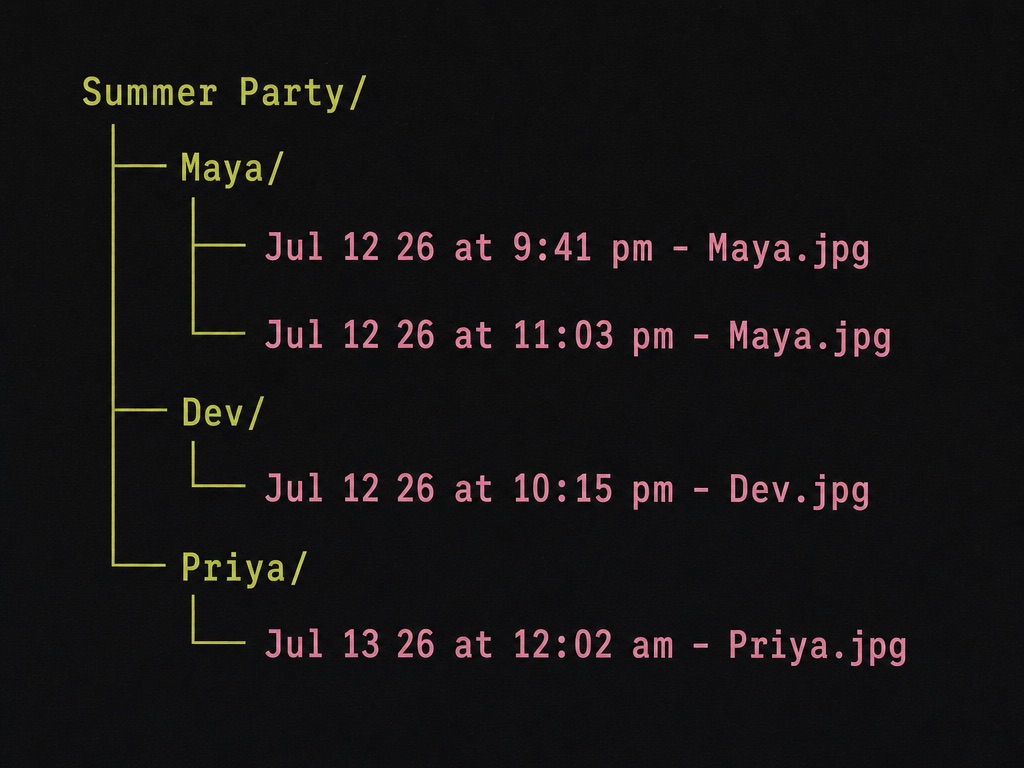
Photos are saved to your own Google Drive at full resolution, organized into folders by guest name, and each file is named by the time it was taken. The gallery never expires.
Where your photos go
Photos are stored in your own Google Drive, in folders GalleryQR creates for you. You own the files from the moment they are uploaded. Every file is named with the time the photo was actually taken, read from the photo itself, so your event stays in order.
Frequently asked questions
Do attendees need to install anything?
No. Attendees scan the QR code with their phone camera and upload from the browser. There is no app and no account creation, so participation does not depend on IT policies or personal devices.
Who owns the photos from a company event?
The account that created the event. Photos are stored in that account's Google Drive, so running the event from a company Google account keeps everything on company storage from the start.
Can we match the QR code to our branding?
Yes. The built-in QR designer lets you style the code and its frame, and you can order professionally printed signs and table cards for the venue.
More questions are answered on the FAQ page, or email us at hello@galleryqr.com.