Collect every family reunion photo with one QR code.
A reunion gathers three or four generations of photographers, then scatters their photos across group texts, email threads, and phones that never sync. One QR code at the reunion collects everything. Everyone uploads from their browser, and every photo lands in your own Google Drive organized by name.
No app. No guest accounts. No subscription. No expiry.
$39 one-time payment covers unlimited events.
- Price
- $39, one time
- Events
- Unlimited
- Guest app
- None needed
- Storage
- Your own Google Drive
- Resolution
- Full, always
- Expiry
- Never
Made for family reunions
Simple enough for every generation
If a relative can point their phone camera at a code, they can contribute. There is no app to find, no password to reset, and no account to create, which is exactly what a mixed-age crowd needs.
The group photo, from every camera
Everyone lines up, eight phones come out, and normally you never see seven of those shots. With one gallery, every version of the group photo lands in the same folder.
A family archive that lasts
Photos save to your own Google Drive at full resolution and never expire. This year's reunion becomes part of the family record, and the next reunion is covered by the same one-time payment.
A photo plan for the reunion
Give each gathering a clear home
Use one gallery for the whole reunion weekend, or create separate galleries for dinner and the picnic. Each event has its own QR code. Share the matching gallery link in the family group chat before everyone arrives.
Make uploading part of the group photo
Put a QR card on each table and ask everyone to upload after the group photo. Have one relative help anyone who needs a hand with their phone. The printed card and the shared link open the same gallery.
Bring the scattered photos back together
Send the link again after everyone gets home, while the photos are easy to find. Browse contributions by guest, and keep the originals in the organizer’s Google Drive for the family archive.
Wording for your QR table card
Our family, through everyone’s eyes. Scan to share your reunion photos and videos. No app or account needed.
Copy this wording into the QR designer after creating your event. Use your event’s own QR code on the card, then download it to print at home. Professional printing is optional and costs extra.
How GalleryQR works
You create a gallery, guests scan a QR code, and photos arrive in your Google Drive. Setup takes about two minutes.
Before your event
Create your gallery and print your code
Connect Google Drive, name your event, and you get a QR code plus a link like galleryqr.com/e/your-event. Print the code on table cards, project it on a screen, or text the link to everyone.
During your event
Guests scan and upload
Guests point their phone camera at the code and upload straight from the browser. There is nothing to install and no account to create. You can watch photos arrive live as a slideshow.
After your event
Everything is in your Drive
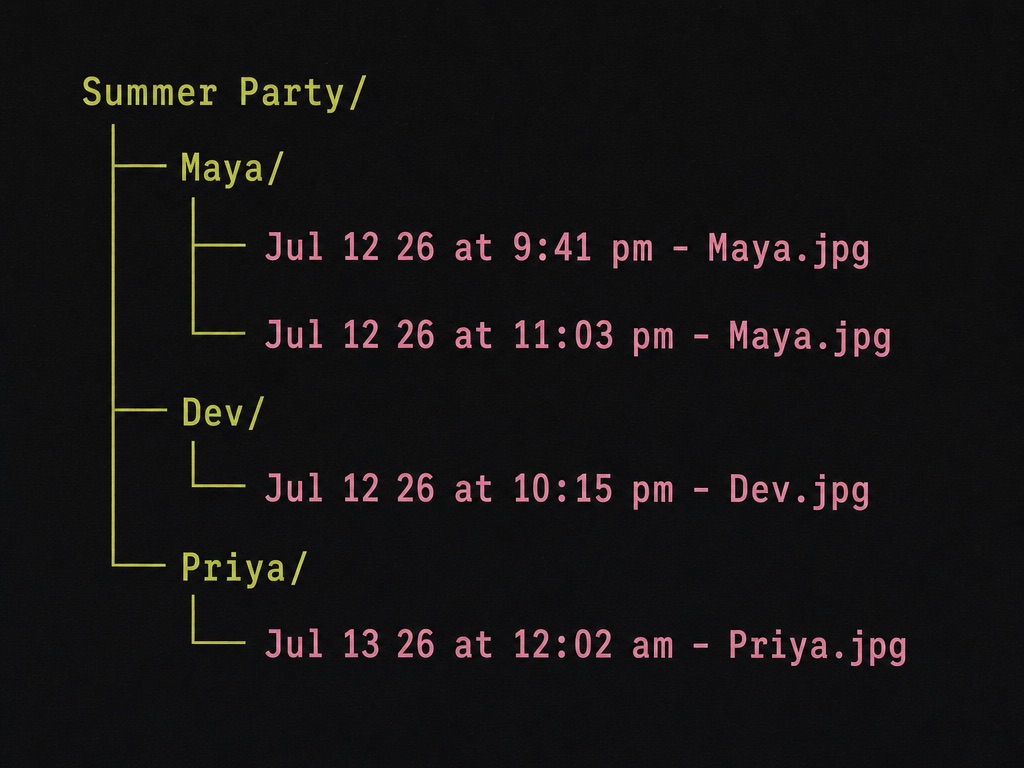
Photos are saved to your own Google Drive at full resolution, organized into folders by guest name, and each file is named by the time it was taken. The gallery never expires.
Where your photos go
Photos are stored in your own Google Drive, in folders GalleryQR creates for you. You own the files from the moment they are uploaded. Every file is named with the time the photo was actually taken, read from the photo itself, so your event stays in order.
Frequently asked questions
Can older relatives really use it?
Yes. Uploading is two steps: scan the QR code with the phone camera, then pick photos in the browser. There is no app store visit and no account creation, which removes the steps that usually stop people.
How does everyone see the photos afterward?
Share the gallery link in the family group chat. Everyone can browse the full gallery from that link, and the organizer has every original in their Google Drive.
What does it cost for a big family?
$39 one time, regardless of guest count. Unlimited photos, unlimited guests, unlimited events, and no subscription. Next year's reunion is included.
More questions are answered on the FAQ page, or email us at hello@galleryqr.com.