Collect every birthday party photo with one QR code.
Put one QR code on the table and every guest becomes your photographer. Guests scan it with their phone camera and upload straight from the browser. There is no app to install and no account to create. Every photo arrives in your own Google Drive at full resolution, organized by guest name.
No app. No guest accounts. No subscription. No expiry.
$39 one-time payment covers unlimited events.
- Price
- $39, one time
- Events
- Unlimited
- Guest app
- None needed
- Storage
- Your own Google Drive
- Resolution
- Full, always
- Expiry
- Never
Made for birthday parties
Kids' parties, while you actually host
You are cutting cake, wrangling ten kids, and refilling juice. The parents at the party are all taking photos anyway. A QR code on the table means those photos come to you instead of dying in other people's camera rolls.
Milestone birthdays
A 30th, 50th, or 80th brings together people who rarely share photos with each other. One code collects the toast, the cake, and every table's candids into a single gallery the guest of honor keeps forever.
Surprise parties
The reaction moment happens once and every phone in the room catches a different angle of it. Collect all of them. You can also watch photos arrive live as a slideshow on a TV during the party.
How GalleryQR works
You create a gallery, guests scan a QR code, and photos arrive in your Google Drive. Setup takes about two minutes.
Before your event
Create your gallery and print your code
Connect Google Drive, name your event, and you get a QR code plus a link like galleryqr.com/e/your-event. Print the code on table cards, project it on a screen, or text the link to everyone.
During your event
Guests scan and upload
Guests point their phone camera at the code and upload straight from the browser. There is nothing to install and no account to create. You can watch photos arrive live as a slideshow.
After your event
Everything is in your Drive
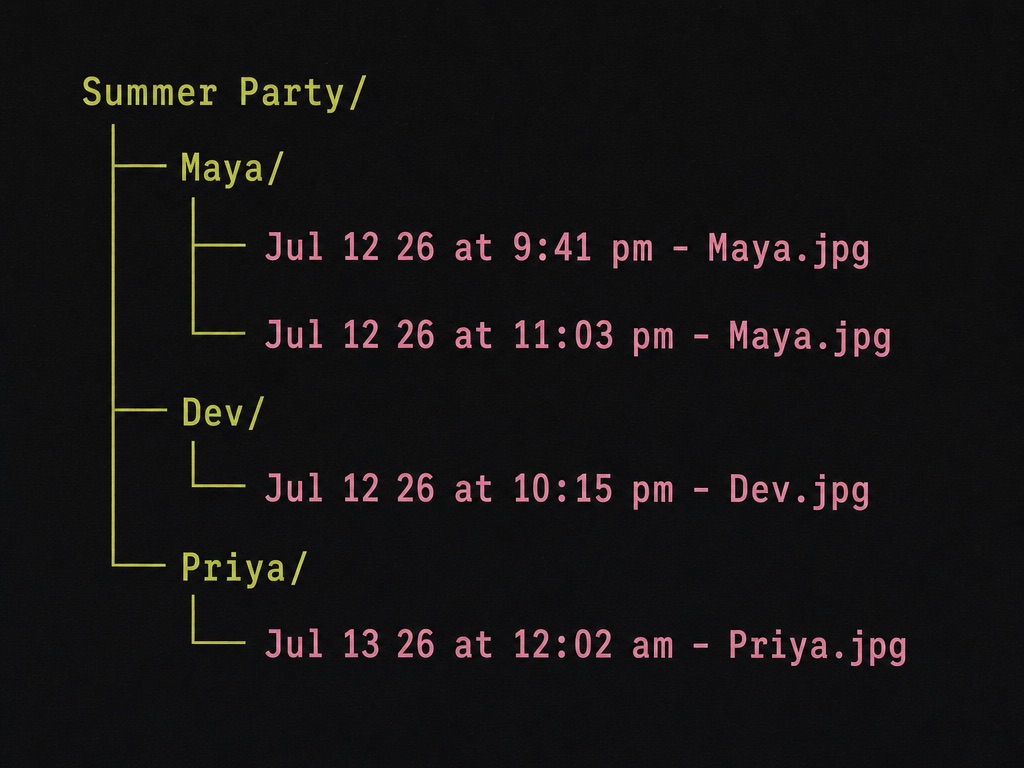
Photos are saved to your own Google Drive at full resolution, organized into folders by guest name, and each file is named by the time it was taken. The gallery never expires.
Where your photos go
Photos are stored in your own Google Drive, in folders GalleryQR creates for you. You own the files from the moment they are uploaded. Every file is named with the time the photo was actually taken, read from the photo itself, so your event stays in order.
Frequently asked questions
Do guests need to download an app at the party?
No. Guests point their phone camera at the QR code and upload from the browser. It works on iPhone and Android with nothing to install and no account to create.
Can I reuse GalleryQR for my next birthday party?
Yes. The $39 payment is one time and covers unlimited events on your account, so every birthday, holiday, and get-together gets its own gallery and QR code at no extra cost.
Can guests upload videos from the party too?
Yes. Guests can upload both photos and videos at original quality, and videos are saved to a videos folder inside your event's Google Drive folder.
More questions are answered on the FAQ page, or email us at hello@galleryqr.com.